
For many South Africans, tax filing season is about one thing: finding out whether the South African Revenue Service owes them money.
The good news is that auto-assessments will start rolling out from 1 July 2026, potentially allowing millions of taxpayers to receive refunds without having to submit a tax return.
SARS has now released the key dates and changes for the 2026 filing season. Here’s what taxpayers need to know.
When does filing season start?
The 2026 filing season will run according to the following timetable:
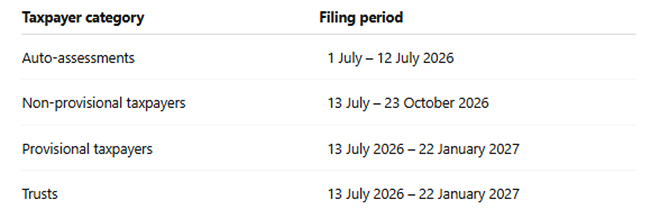
A non-provisional taxpayer is generally someone who earns a salary or wage from an employer and whose tax is deducted through PAYE.
A provisional taxpayer typically earns income in addition to a salary or earns income from sources other than employment. Examples are business income, freelance or consulting income, rental income, and investment income.
Provisional taxpayers and trusts have until 22 January 2027 to submit their returns.
What is an auto-assessment?
An auto-assessment is SARS’s way of completing your tax return on your behalf.
The tax authority uses information already received from employers, banks, medical schemes, retirement funds, and insurers to calculate your tax position.
For qualifying taxpayers, this means there may be no need to complete and submit a tax return manually.
How will I know if I have been auto-assessed?
Taxpayers selected for auto-assessment will receive an SMS or email from SARS between 1 and 12 July 2026.
The notification will indicate whether you qualify for a refund, or you owe money to SARS.
Taxpayers can also check their status through the SARS Online Query System (SOQS) by selecting “My Auto Assessment Status”.
SARS advises taxpayers to wait for their SMS or email notification before logging into eFiling or the SARS MobiApp.
Register online or download the MobiApp on your phone or tablet.
What should I do if I receive an auto-assessment?
Receiving an auto-assessment does not mean you should simply ignore it.
Taxpayers should carefully review the assessment and ensure that:
- all income has been included;
- tax certificates have been captured correctly;
- deductions have been reflected accurately;
- banking details are correct; and
- contact information is up to date.
Do I need to accept my auto-assessment?
No. If all the information is correct, no further action is required.
Taxpayers do not need to formally accept the assessment or submit an Income Tax Return (ITR12).
If a refund is due, SARS says it will automatically pay the money into the bank account recorded on its system.
What if SARS got something wrong?
If information is missing or incorrect, taxpayers must update and submit their ITR12 return through SARS eFiling or the SARS MobiApp.
This could include:
- additional income that was not reflected;
- missing tax certificates;
- incorrect deductions; or
- changes to personal information.
What happens if I am not auto-assessed?
If you do not receive an SMS or email notification from SARS by 12 July, you should assume that you have not been selected for auto-assessment.
In that case, you will need to submit an ITR12 return yourself.
The filing period for non-provisional taxpayers opens on 13 July and closes on 23 October 2026.
What’s new for filing season 2026?
SARS has introduced several changes aimed at simplifying the filing process.
- More pre-populated information. Certain information, including some investment income, will already be completed on tax returns, reducing the amount of manual data capture required.
- Simpler tax-return questions. The ITR12 has been redesigned with clearer wording and fewer repetitive questions.
- Improved residency reporting. New questions and date fields have been added to help taxpayers provide residency information more accurately.
- Easier medical scheme reporting. A dropdown list of approved medical schemes has been added to reduce errors when completing returns.
- WhatsApp services. Taxpayers can now access certain SARS documents through WhatsApp. This includes Notices of Assessment (ITA34), Statements of Account, and the ability to upload supporting documents. Access the SARS WhatsApp service by saving the SARS WhatsApp number (0800 11 7277) to your mobile device and sending a basic greeting.
- Improved eFiling experience. SARS says the updated eFiling platform offers easier navigation, quicker access to assessments, and clearer alerts when returns are overdue.
- Reduced verification issues. A new declaration questionnaire is intended to identify potential issues earlier, reducing the likelihood of taxpayers being selected for verification.
How can I avoid delays?
Before filing season begins, taxpayers should make sure that their banking details are correct, their cellphone number is current, and their email address is up to date.
Incorrect information can delay refunds and create unnecessary administrative problems.
How do I know whether I need to submit a return?
Taxpayers who are unsure whether they need to file a return can use SARS’s online “Do you need to submit a return?” tool. This can help determine whether a return is required based on individual circumstances.
What if I forgot my eFiling password?
Taxpayers who have forgotten their eFiling username or password can reset their credentials online before filing season begins.
Doing so early can help to avoid last-minute frustration when filing deadlines approach.
How can I get help from SARS?
SARS encourages taxpayers to use digital channels wherever possible.
Assistance is available through:
- SARS eFiling;
- the SARS MobiApp;
- the SARS Online Query System (SOQS); and
- SARS’s YouTube tutorials.
Here is where you can register online or download the MobiApp on your phone or tablet.
The SARS Online Query System can also be used to retrieve tax reference numbers, submit supporting documents, and raise queries without visiting a branch.
Taxpayers who require in-person assistance should book an appointment before visiting a SARS branch. Click here to make an appointment.
SARS says Mobile Tax Units and pop-up service points will also be available in various regions during filing season.
Beware of scams
SARS has again warned taxpayers to be alert to phishing scams and fraudulent emails or SMS messages, particularly during filing season when many taxpayers are expecting refunds.
Taxpayers should never click on suspicious links, share login credentials, or make payments into unknown bank accounts.
Suspicious messages can be reported to SARS at phishing@sars.gov.za.

I agree to be assisted by SARS
I agree to be honest and agree